
How to Submit a Daily Deal
Daily Deals are featured 72-hour promotions showcased on Jane and in our Daily Deals email. Sellers can now submit and manage Daily Deal requests directly from the Seller Portal—no Microsoft Form required.
This guide will walk you through the submission process, explain the review workflow, and answer common questions about Daily Deals.
Before You Submit
Before submitting a Daily Deal request, please ensure your product meets the following requirements:
- Published Product: The product must be published and available for purchase on Jane.
- 72-Hour Promotion: Daily Deals run for 72 hours, beginning at 12:00 AM PT on the start date and ending at 11:59 PM PT on the end date.
- Lowest Price: Your Daily Deal must be offered at the lowest price available on Jane and any comparable platforms throughout the promotion.
- Inventory: We recommend having a minimum of 200 total units available. For products with variants, each variant should have at least 20 units available while maintaining the recommended total inventory.
- Seasonal Relevance: Products should align with current trends, seasons, or upcoming holidays whenever possible.
- Seller Standing: Sellers must remain in good standing and meet the fulfillment expectations outlined in the Jane Seller Playbook.
Please Note: Submitting a Daily Deal request does not guarantee placement. Our Merchandising Team reviews all submissions and selects products based on seasonality, assortment, inventory, pricing, and promotional opportunities.
Option 1: Submit a Daily Deal from the Daily Deals Page
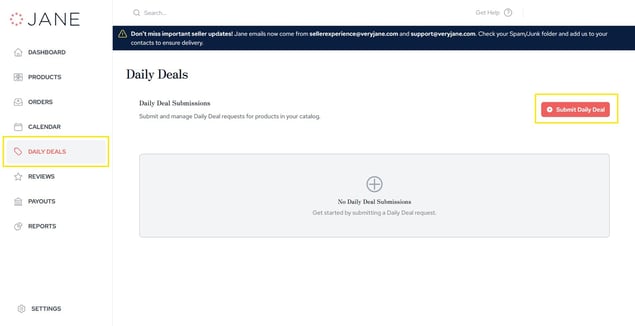
Step 1: Navigate to Daily Deals
From your Seller Portal, navigate to: Seller Portal → Daily Deals
You'll see a list of all of your current and previous Daily Deal submissions.
Step 2: Complete the Submission Form
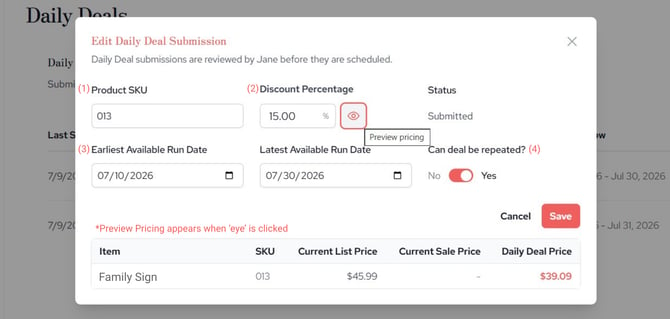
Click Submit Daily Deal in the upper-right corner. A submission window will open.
Complete the required fields:
-
Product SKU
-
Enter the SKU for the published product you'd like to feature.
-
The system will verify that the SKU belongs to one of your active published products.
-
-
Discount Percentage
-
Enter the percentage discount you'd like to offer. To preview the final Daily Deal pricing, click the Eye icon. The preview will display:
-
Current List Price
-
Current Sale Price (if applicable)
-
Projected Daily Deal Price
-
-
If you adjust the discount percentage, simply click outside of the field and the preview will automatically refresh.
-
-
Available Run Dates
-
Choose the earliest and latest dates your product is available to be featured.
-
For evergreen products, feel free to provide a broad availability window.
-
For seasonal or holiday products, we recommend selecting dates that align with that selling season (generally within about 10 weeks of the holiday or event).
-
-
Can this Daily Deal be repeated?
-
Select Yes or No. Choose Yes if you're happy for this product to be featured again in the future without submitting a new request.
-
Step 3: Submit
Click Submit. Your request will be sent to the Jane Merchandising Team for review.
Option 2: Submit a Daily Deal from Your Product Catalog
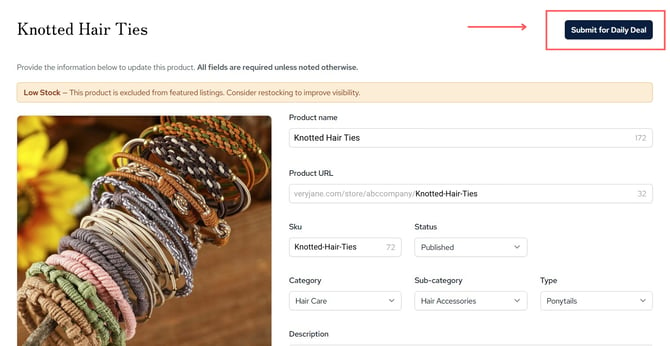
You can also start a Daily Deal submission directly from an individual product.
Step 1: Open Product in Catalog
Navigate to: Product Catalog. Open the product you'd like to feature.
Step 2: Submit Daily Deal
Click Submit a Daily Deal in the upper-right corner. The Daily Deal submission window will open with the product SKU already filled in. Simply complete the remaining fields and submit your request.
Tracking Your Daily Deal Requests
All of your submissions are visible from the Daily Deals page.
You'll be able to view:
- Product
- SKU
- Discount Percentage
- Available Run Dates
- Last Modified
- Last Submitted
- Current Status
Daily Deal Statuses
.png?width=670&height=316&name=Family%20Sign%20(1).png)
Your submission will move through several statuses during the review process.
| Status | What it means |
|---|---|
| Submitted | Your request has been received and is awaiting review. |
| Change Requested | Our team has requested updates before the deal can be approved. |
| Re-submitted | You've updated the submission and sent it back for review. |
| Approved | Your Daily Deal has been approved and is eligible to be scheduled. |
| Denied | The submission was not approved for a Daily Deal. |
| Cancelled | The request has been cancelled or deleted. |
You'll receive email notifications whenever your submission status changes.
Frequently Asked Questions
Can I submit an unpublished product?
No. Only published products are eligible for Daily Deals.
Can I edit a submission after sending it?
Yes. Until your deal has been approved or scheduled, you can update your submission from the Daily Deals page if changes are needed.
How is my Daily Deal price calculated?
Your Daily Deal price is automatically calculated using the discount percentage you enter.
Use the Eye icon during submission to preview exactly what your pricing will look like before submitting.
Can product prices change after I submit?
Once your Daily Deal is approved and scheduled, the pricing used for your promotion is locked in. Changes you make to your product pricing afterward will not affect your scheduled Daily Deal.
How far in advance should I submit a Daily Deal?
We recommend submitting as early as possible to give our merchandising team the best opportunity to schedule your product.
For seasonal items, be sure to select an availability window that matches the season or holiday you'd like to be featured.
Tips for Success
- Submit products with strong inventory availability.
- Double-check your discount before submitting.
- Use the pricing preview to verify your final Daily Deal price.
- Keep seasonal availability windows relevant to the product.
- Check your Daily Deals page regularly for status updates or requested changes.